:quality(50))
What Are DevOps Automation Tools?
DevOps automation tools are platforms and frameworks that eliminate manual steps across the software development lifecycle, covering from code integration and testing to infrastructure provisioning, deployment, and monitoring.
They help engineering teams move faster while maintaining stability and compliance across complex IT environments.
The main perks of using DevOps automation tools include:
Faster release cycles through automated CI/CD pipelines
Reduced human error in deployment and infrastructure configuration
Consistent, repeatable workflows across development, staging, and production
Greater observability into pipeline health and operational performance
Seamless integration across cloud, on-premises, and hybrid systems
Research indicates that DevOps/application release-related jobs account for 7% of all monthly WLA jobs run, and WLA’s role in release management grew from 28% to 44% of organizations between 2022 and 2024.
→ Read more on how orchestration ties these capabilities together.
5 Best DevOps Automation Tools: A Quick Overview
Platform | Best For | Standout Feature | |
|---|---|---|---|
Beta Systems ANOW! Suite |
| 500+ integrations, jobs-as-code, cloud-native | |
GitHub Actions | CI/CD automation for GitHub-native teams | Native GitHub integration, 20,000+ marketplace actions | |
GitLab CI/CD | All-in-one DevOps for GitLab-native orgs | Built-in SCM, CI/CD, and security scanning | |
Jenkins | Teams needing open-source CI/CD flexibility | Extensible with 1,800+ plugins | |
Terraform (by HashiCorp) | Infrastructure-as-code across multi-cloud | Provider-agnostic IaC with state management |
Beta Systems ANOW! Suite: Best DevOps Automation Tool for Enterprise-Scale Operations
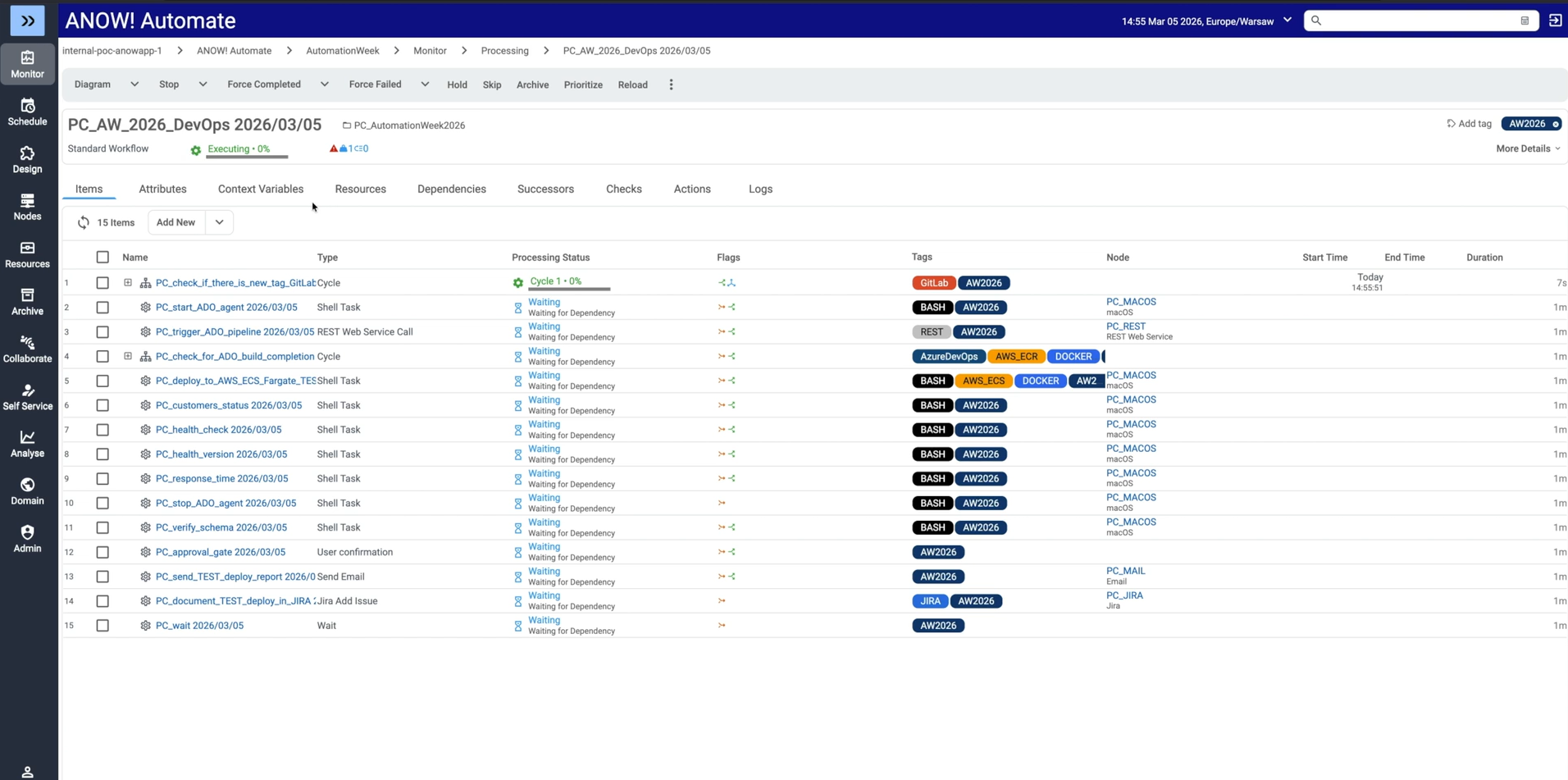
Beta Systems’ ANOW! Suite is a modern, cloud-native workload automation, orchestration, and observability platform built for large enterprises managing complex DevOps pipelines across hybrid and multi-cloud environments, enabling hybrid cloud orchestration at enterprise scale.
Unlike point CI/CD tools, as a SOAP, ANOW! Automate acts as a meta-orchestrator, coordinating:
Cross-system workflows across cloud hyperscalers
SAP environments
ITSM platforms
Data pipelines
DevOps toolchains from a single control plane
Beta Systems offers custom pricing for all ANOW! Suite solutions, offering fair and transparent licensing options that empower customers to achieve the best cost-deployment efficiency without vendor lock-in.
Jobs-as-Code for Scalable CI/CD
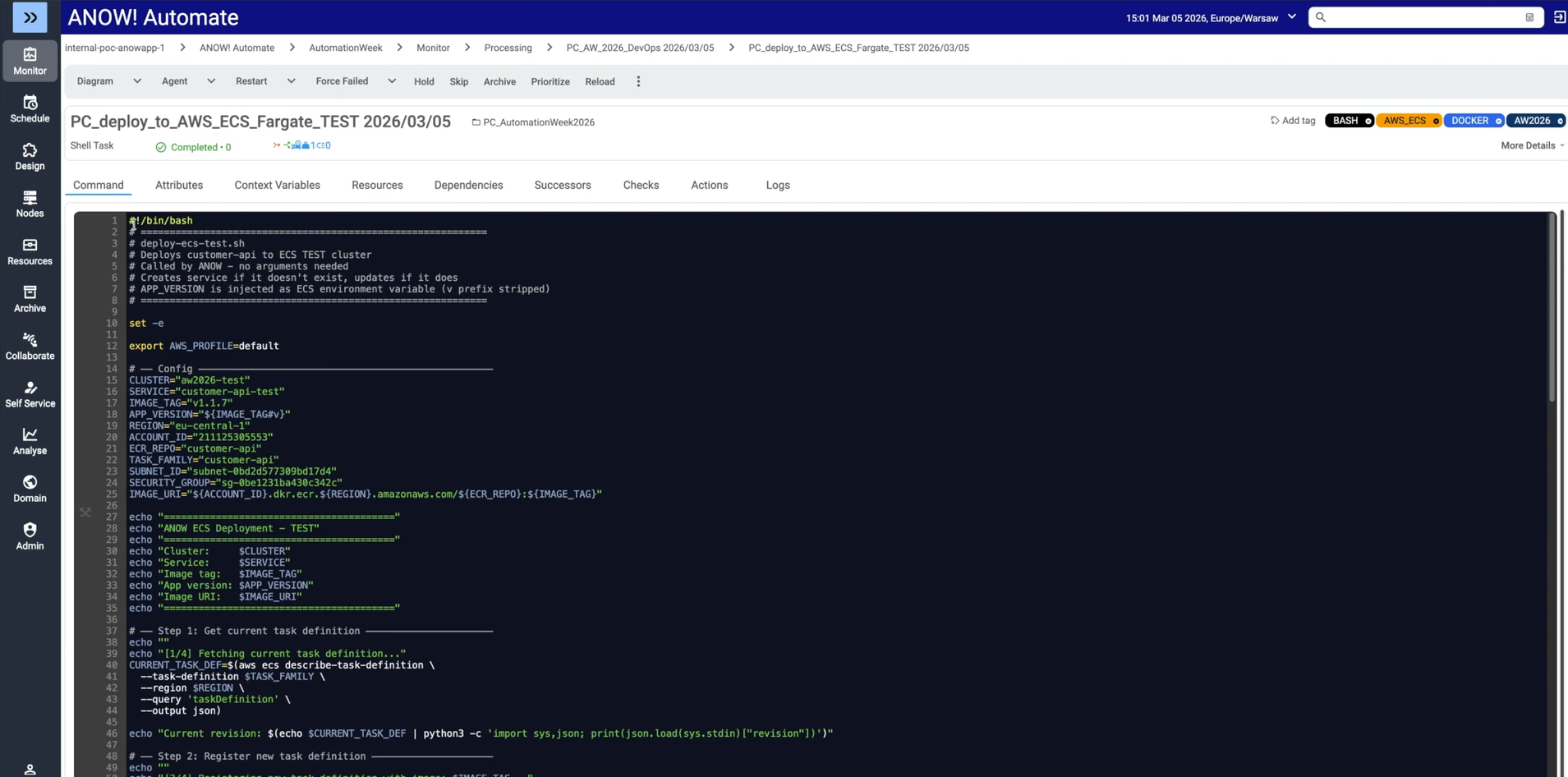
ANOW! Automate uses a stateless, jobs-as-code approach, managing all automation artifacts as standardized JSON definitions fully compatible with Git-based systems.
Artifacts integrate directly into CI/CD pipelines and can be merged, branched, tagged, and diffed like any other code.
This makes ANOW! a natural extension of any enterprise DevOps workflow.
Infinite Integration Capability
ANOW! Automate ships with over 500 out-of-the-box connectors.
These cover:
Cloud hyperscalers (AWS, Azure, Google Cloud)
DevOps toolchains
Data platforms (Snowflake, BigQuery, Databricks, AWS Glue) for enterprise-scale data workflow automation
ITSM tools (ServiceNow, Jira, Remedy)
Legacy schedulers

Integration Architecture
Discover Your Integration Possibilities
Connect your Beta Systems platform with the enterprise applications, APIs, and services that you already use. Streamline data exchange and orchestrate end-to-end workflows across your IT landscape.
For any system outside the pre-built library, the Infinite Integration framework enables rapid onboarding via API, CLI, scripting, or JavaScript without being locked into a vendor’s connector catalog.
Purpose-Built Workload Observability
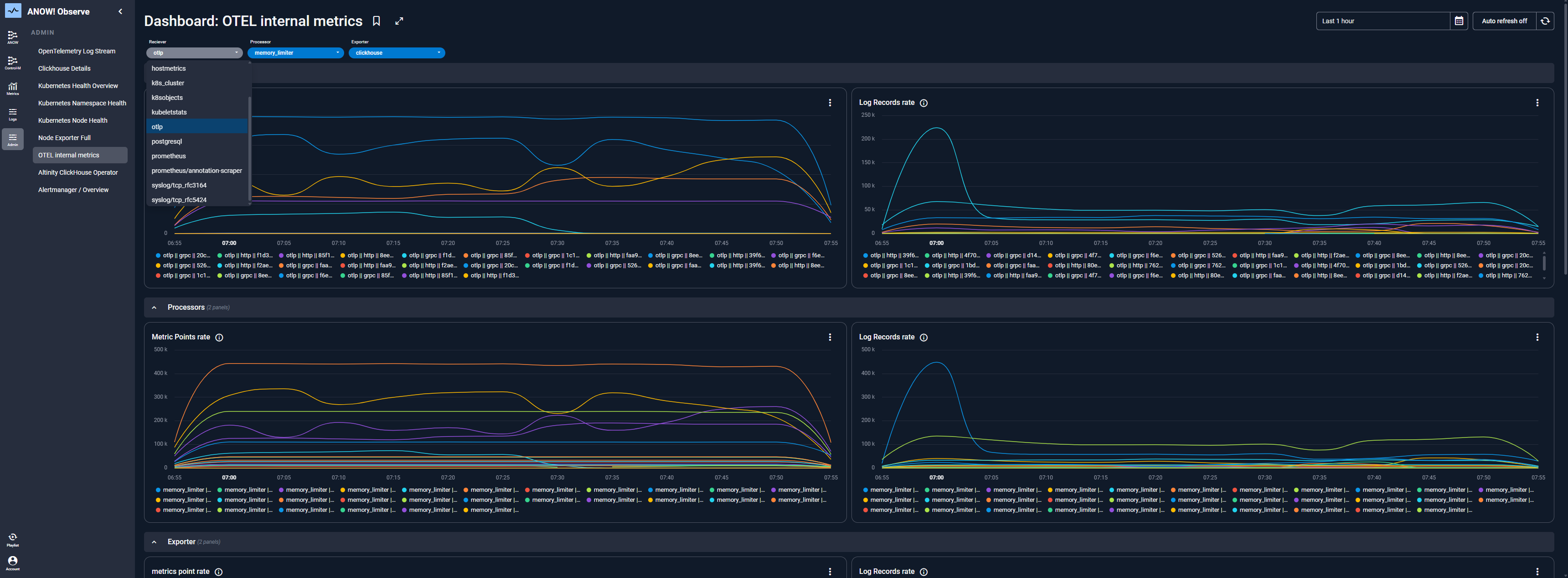
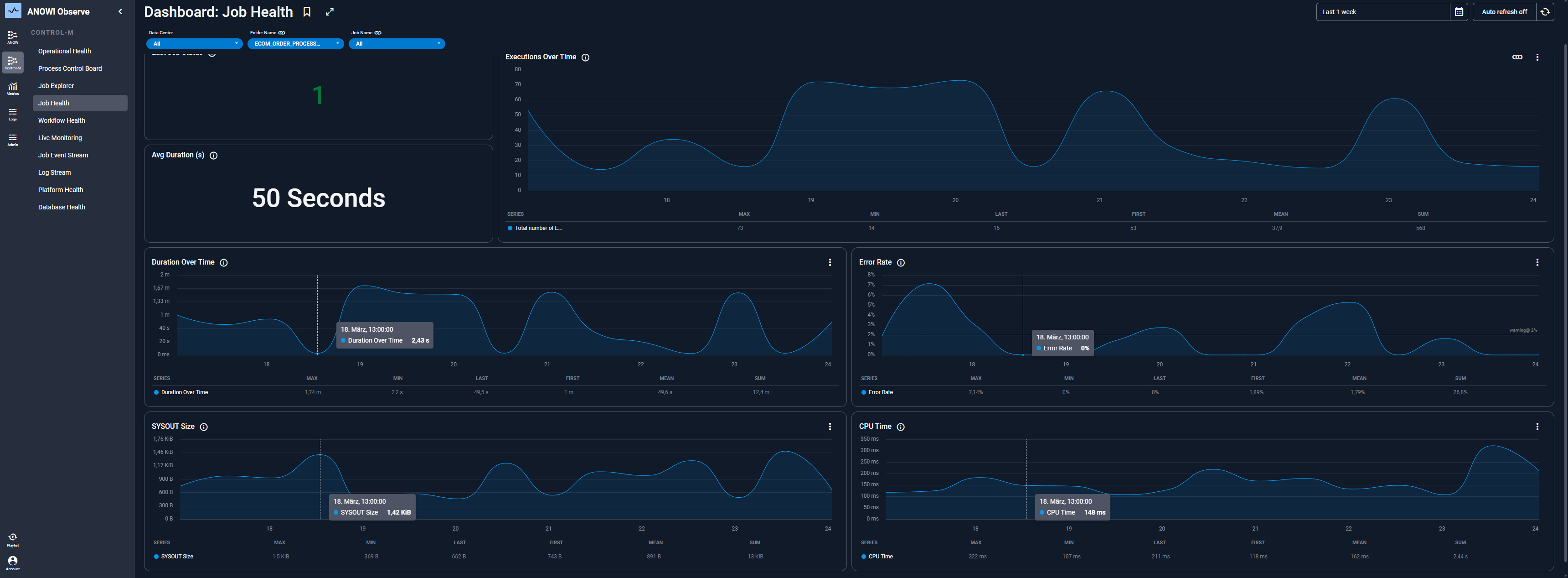
ANOW! Observe embeds OpenTelemetry-native telemetry directly into the orchestration engine. This means you unlock real-time anomaly detection, SLA risk forecasting, and automated remediation across all pipelines.
The result is a closed-loop system where telemetry and AI continuously refine operational outcomes.
Pro Tip
If your DevOps pipeline spans more than two environments or systems (e.g., SAP + cloud + mainframe), a point CI/CD tool will eventually hit its limits. A platform like ANOW! Automate handles cross-system orchestration natively.
Where Beta Systems Shines
Architecture built for the cloud from day one: ANOW! Automate runs on a Kubernetes-based microservices foundation. Teams can move freely between SaaS, private cloud, and on-premises deployments without reengineering their automation environment.
Sovereign infrastructure for regulated industries: Beta Systems is a European-headquartered vendor offering full data residency control and GDPR-compliant architecture. This removes a critical compliance risk that US-based vendors often can’t fully address. For example, its work with the AWS Europe Sovereign Cloud that enables organizations to run workloads in a fully EU-operated environment with strict data sovereignty and regulatory alignment.
A structured, low-disruption path off legacy platforms: Rather than requiring teams to rebuild workload definitions from scratch, Beta Systems provides migration toolkits that handle the heavy lifting when moving away from vendors.
Where Beta Systems Falls Short
AI capabilities still catching up: The observability layer in ANOW! Observe is genuinely useful for telemetry-driven automation, but the platform's broader AI feature set isn't yet on par with vendors positioning AI as a core differentiator.
UI available in three languages only: The ANOW! interface currently supports English, German, and Polish. A UI redesign is in progress.
Customer Reviews
G2 Review (4/5): “I really love how ANOW facilitates the real-time and centralized control of the end nodes, workflows for enterprises. Especially managing at data center scale workflow is impressive.”
G2 Review (4.5/5): “ANOW! Automate presents itself at its best behavior when it aimed at closing the gap between the old and new systems and the cloud. This integration helps to have a unified single point where all of the data is collected and does not result in data silos in any of our IT systems.”
Who Beta Systems is Best For
Head of IT Operations / I&O: Teams managing complex hybrid IT environments spanning mainframe, on-prem, and multi-cloud who need a single point of control across all DevOps pipelines and workloads.
Enterprise Automation Lead / CoE Manager: Teams consolidating multiple schedulers and legacy automation into a unified, governed platform with self-service and policy-based control.
Chief Data Officer / Director of Data Platforms: Leaders requiring reliable, observable, and cross-platform orchestration for data pipelines that feed into or out of DevOps workflows.
Ready to modernize your legacy DevOps pipeline?
Explore how Beta Systems accelerates DevOps automation.
GitHub Actions: Best for CI/CD Automation Within GitHub
GitHub Actions is a native CI/CD and workflow automation platform built directly into GitHub.
It allows development teams to automate builds, tests, and deployments using event-driven workflows triggered by code events such as pushes, pull requests, and releases.
Key Features
Event-driven CI/CD: Workflows trigger automatically on GitHub events such as commits, pull requests, and issue comments, reducing the need for manual pipeline management.
20,000+ marketplace actions: A large library of reusable community-built actions that accelerates setup for common DevOps tasks including testing, deployment, and notifications.
Matrix builds: Run the same workflow across multiple operating systems and runtime versions in parallel, cutting test time significantly.
Where GitHub Actions Shines
Native GitHub integration: Zero configuration overhead for teams already on GitHub as workflows live in the same repository as the code they automate
Massive ecosystem: The GitHub Marketplace provides pre-built actions for almost every common DevOps task, dramatically reducing setup time
Where GitHub Actions Falls Short
Not built for complex cross-system orchestration: GitHub Actions is purpose-built for code-centric CI/CD. It does not handle enterprise workload scheduling, mainframe integration, SAP orchestration, or large-scale hybrid job management
Compute costs can escalate: For high-volume private repositories, per-minute pricing adds up quickly at enterprise scale without careful monitoring.
Customer Reviews
Nils K. says, “I love GitHub Actions and highly credit them for being cost free for open source projects. I used it for automated testing, compiling and deploying.”
Bret Fisher warns, “It lacks a central view of status across an org or user's repos.”
Who GitHub Actions Is Best For
Software development teams: Already using GitHub for source control who need a quick, integrated path to CI/CD automation without introducing a separate tool.
GitLab CI/CD: Best for All-in-One DevOps Within a Single Platform
GitLab CI/CD is the native automation layer within the GitLab DevSecOps platform. It covers the entire software delivery lifecycle without requiring teams to stitch together multiple tools.
Key Features
Built-in SCM + CI/CD: Source control, pipeline automation, and deployment management all live within a single interface, reducing context switching and tool sprawl
Security scanning: Native SAST, DAST, container scanning, and dependency analysis baked into the pipeline
Auto DevOps: Automatically detects, builds, tests, deploys, and monitors applications based on best-practice templates, reducing manual pipeline setup.
Where GitLab CI/CD Shines
True single-platform DevOps: Eliminates the need for separate tools for SCM, CI/CD, and security scanning as everything lives in one place
Strong compliance and audit trail: Built-in approval workflows, compliance pipelines, and audit logging make GitLab a natural fit for regulated industries
Where GitLab CI/CD Falls Short
Steep learning curve for advanced features: While standard pipelines are straightforward, complex configurations require significant expertise
Not a workload automation platform: Like GitHub Actions, GitLab CI/CD is designed for software delivery pipelines, not enterprise-scale workload scheduling
Customer Reviews
Ankan S. says, “GitLab provides a whole array of functionalities such as repository management, CI/CD, issue tracking, and code editing, which makes it a very powerful all-in-one solution.”
Sumeet S. notes, “The initial setup for CI/CD runners and permissions can be a bit complex, especially for new users.”
Who GitLab CI/CD Is Best For
Engineering teams wanting a single integrated platform: Organizations that want to consolidate SCM, CI/CD, and security tooling without managing multiple vendor relationships.
Jenkins: Best for Teams Needing Maximum CI/CD Flexibility
Jenkins is one of the most widely adopted open-source automation servers in the world. It provides a highly extensible CI/CD framework, allowing developer teams to build custom pipelines for almost any language, tool, or deployment target.
Key Features
1,800+ plugins: An extensive ecosystem covering integration with virtually every build tool, version control system, cloud provider, and testing framework
Pipeline-as-code: Jenkins uses file-based pipeline definitions stored in source control for repeatable, versioned automation
Distributed builds: Master/agent architecture enables parallel builds across multiple machines, reducing build times for large projects
Where Jenkins Shines
Maximum customizability: The plugin ecosystem and scripted pipeline capability give teams almost unlimited flexibility to build exactly the automation they need
Self-hosted control: Full ownership of data and infrastructure with no external SaaS dependency for mission-critical pipelines
Where Jenkins Falls Short
Significant maintenance overhead: Jenkins requires ongoing plugin management, security patching, and infrastructure maintenance
No built-in enterprise orchestration: Cross-system dependencies, SLA management, and hybrid cloud job scheduling require additional tooling
Customer Reviews
Sree K. praises that, “Jenkins mostly just keeps the CI lights on for our UI automation, which is honestly what I need most days.”
Sandeep R. mentions, “Managing plugins and upgrades some causes compatibility issues, and the UI feels outdated compared to modern CI/CD tools.”
Who Jenkins Is Best For
DevOps and platform engineering teams: With the internal expertise to manage a self-hosted automation server and a need for maximum pipeline flexibility and control
Terraform (by HashiCorp): Best for Infrastructure-as-Code Across Multi-Cloud
Terraform is the leading open-source infrastructure-as-code (IaC) tool, enabling teams to define, provision, and manage cloud and on-premises infrastructure using declarative configuration files.
For DevOps teams building scalable, reproducible infrastructure automation, Terraform has become an industry standard.
Key Features
Provider-agnostic IaC: Provision infrastructure across any cloud or on-premises environment using a consistent workflow and HCL configuration language
State management: Terraform tracks the current state of infrastructure, enabling accurate change plans, drift detection, and safe updates without manual reconciliation
Modular architecture: Reusable Terraform modules allow teams to standardize infrastructure patterns across projects and teams at scale
Where Terraform Shines
Multi-cloud infrastructure at scale: Terraform’s provider-agnostic model makes it the go-to choice for organizations running workloads across AWS, Azure, and Google Cloud simultaneously
GitOps-friendly: Infrastructure definitions stored as code integrate naturally into Git-based workflows and CI/CD pipelines
Where Terraform Falls Short
IaC only and not a full DevOps automation platform: Terraform manages infrastructure provisioning but does not handle application deployment, CI/CD pipeline management, workload scheduling, or runtime orchestration
State file complexity: Managing Terraform state across large teams requires careful backend configuration
Customer Reviews
Moises F. praises, “I can easily configure Terraform in Jenkins, Azure DevOps, Git Actions and I can add code security so that I can get suggestions in CI/CD.”
Sadi K. notes, “Terraform can struggle with state file management, especially in collaborative environments, leading to potential conflicts or complexity.”
Who Terraform Is Best For
Platform engineering and infrastructure teams: Managing cloud infrastructure across multiple providers who need a consistent, version-controlled IaC workflow
How to Choose a DevOps Automation Tool
The right DevOps tools for you depends on your environment, team structure, and the complexity of what you need to automate. Here are the key criteria to evaluate.
Scope of Automation
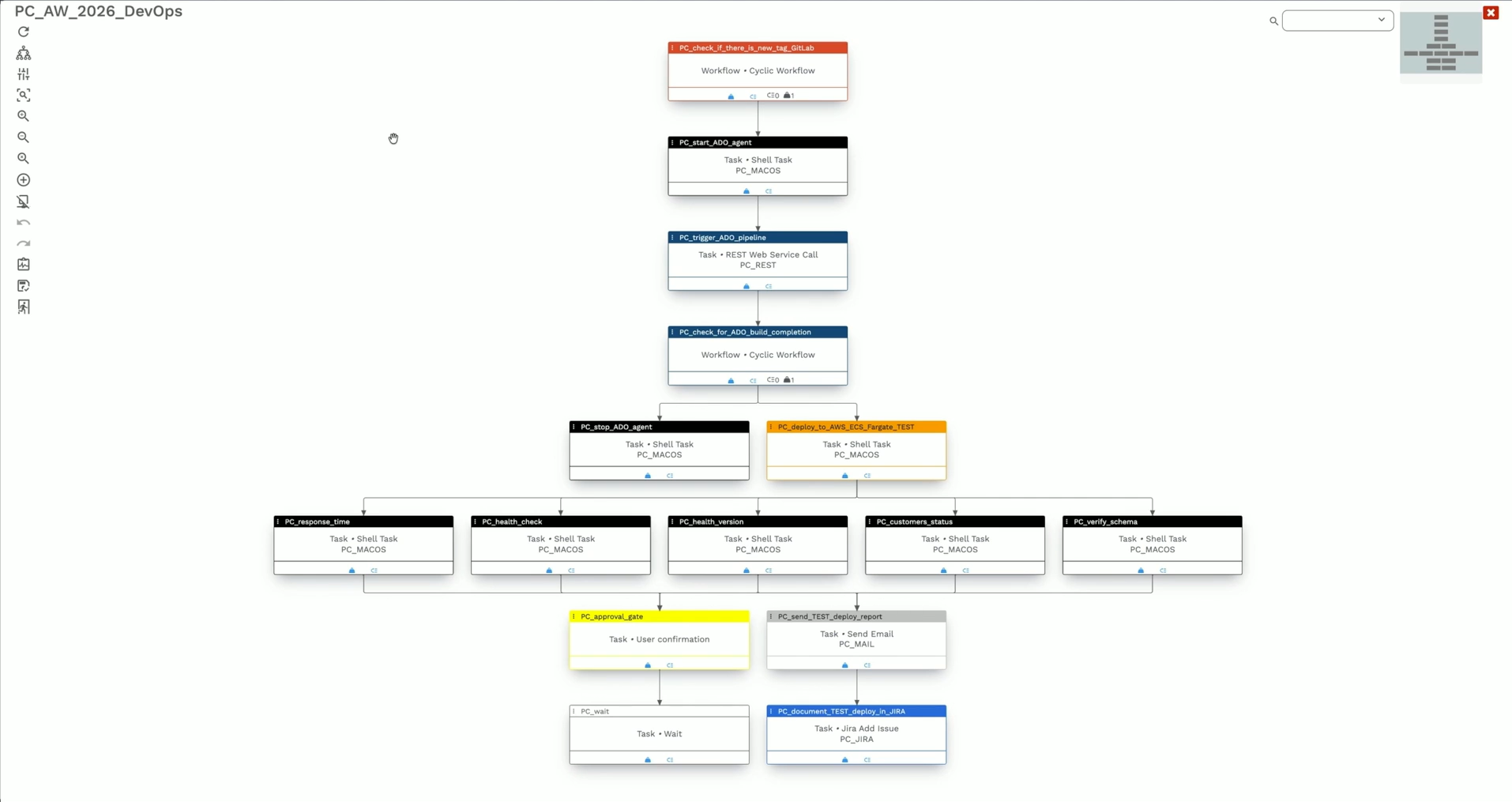
Point CI/CD tools like GitHub Actions or GitLab CI/CD are purpose-built for software delivery pipelines within a specific SCM platform.
If your requirements extend beyond code-centric automation, spanning SAP orchestration, mainframe workloads, data pipelines, or cross-system enterprise job scheduling, you need an enterprise orchestration platform.
34% of organizations cite difficulty integrating WLA with new technologies or platforms as the top factor preventing them from leveraging automation for new use cases.
This is where ANOW! Automate’s 500+ native integrations can drive change through event-driven architecture that provide a single point of control across heterogeneous hybrid environments. No point CI/CD tool can match this.
→ See how modern data center automation tools handle cross-system orchestration at enterprise scale.
Deployment Flexibility
Does your organization need SaaS, private cloud, on-premises, or a hybrid combination? Will your deployment model change as your cloud strategy evolves?
85% of organizations identify cloud infrastructure automation as a top WLA use case, and 81% cited simplifying cloud migrations. This makes multi-cloud orchestration the dominant driver of WLA modernization.
After all, many tools can lock you into a single deployment model.
ANOW! Automate is deployment-agnostic from inception. Organizations can switch between SaaS, private cloud, and on-premises at any time without disruption, backed by a 99.5% availability SLA. This matters especially for regulated industries requiring data sovereignty.
Integration Depth
Evaluate how many native integrations a platform offers versus how many custom connectors you will need to build and maintain. Each custom integration is ongoing technical debt.
With over 500 out-of-the-box connectors, the most of any workload automation vendor, ANOW! Automate reduces the time and cost of onboarding new systems.
Integration Architecture
Discover Your Integration Possibilities
Connect your Beta Systems platform with the enterprise applications, APIs, and services that you already use. Streamline data exchange and orchestrate end-to-end workflows across your IT landscape.
For anything outside the catalog, the Infinite Integration framework handles it without vendor dependency.
Observability and SLA Compliance
Proactive visibility into pipeline health becomes critical when automation programs scale.
Platforms that offer real-time telemetry, SLA risk forecasting, and automated remediation have a leg up over those that do just reactive alerting.
ANOW! Observe integrates OpenTelemetry-native observability directly into the orchestration engine. This enables anomaly detection and SLA risk management before issues impact operations, closing the loop between automation and intelligence.
Automate DevOps Pipelines at Enterprise Scale with Beta Systems
Choosing the right DevOps automation tools in 2026 comes down to the complexity of your environment and the scale of what you need to orchestrate.
GitHub Actions, GitLab CI/CD, and Jenkins serve software delivery teams well for code-centric CI/CD. Terraform handles infrastructure provisioning.
But for large enterprises running complex workloads across hybrid cloud, mainframe, SAP, and distributed systems, where point tools create silos rather than solve them, Beta Systems ANOW! Suite delivers unified data pipeline orchestration, built-in observability, and full data sovereignty at enterprise scale.
Ready to modernize your workload automation?
Contact our experts for a demo of ANOW! Suite, or explore our guide on migrating from legacy workload automation vendors to understand the fastest path to modernization.
Frequently Asked Questions
What is the difference between a CI/CD tool and a workload automation platform?
CI/CD tools like GitHub Actions or Jenkins automate the software build, test, and deployment lifecycle within a development workflow. Workload automation platforms like ANOW! Automate orchestrate complex IT job scheduling, cross-system dependencies, and business-critical processes, often at a scale and complexity beyond what CI/CD tools are designed for.
Can DevOps automation tools work across hybrid cloud and on-premises environments?
Enterprise platforms like ANOW! Automate are built for hybrid environments from the ground up, supporting seamless orchestration across AWS, Azure, Google Cloud, and on-premises infrastructure. Point tools like GitHub Actions or Jenkins require significant custom configuration to achieve the same.
How long does it take to migrate from a legacy automation platform to a modern one?
The time for migration can vary depending on the number of jobs being migrated across platforms. Typically, each phase can take between 2-4 months. Systems' zero-touch migration toolkits automate the conversion of existing workload definitions.
:quality(50))
:quality(50))
:quality(50))