:quality(50))
What is DevOps Automation?
DevOps automation is the practice of using software tools and scripted processes to execute tasks across the software development lifecycle (SDLC) without human intervention.
It connects development and operations teams by automating handoffs between them and turning manual, error-prone steps into repeatable, reliable workflows.
At its core, DevOps automation covers four areas:
Building and testing code automatically on every commit
Provisioning infrastructure through code rather than manual configuration
Deploying applications across environments in a controlled, consistent manner
Monitoring systems and triggering alerts or automated remediation when issues arise
The goal is faster delivery cycles, higher software quality, and reduced operational friction.
Teams that embed automation into their DevOps pipeline can compress release cycles from weeks to hours while maintaining the consistency and reliability that enterprise operations demand.
How DevOps Automation Works
DevOps automation replaces the manual handoffs across the software delivery pipeline with scripted, repeatable processes, triggered automatically based on code changes, schedules, or system events.
Continuous Integration and Testing
Every time a developer pushes code, automation kicks in immediately. For example, CI tools like Jenkins or GitHub Actions run builds and test suites without any human involvement. This means bugs get caught in minutes, not days.
Code is merged into a shared repository
Automated tests (unit, integration, regression) run instantly
Failed builds notify the team before bad code reaches production
Infrastructure Provisioning
Instead of manually configuring servers, DevOps teams use Infrastructure as Code (IaC) tools to spin up and manage environments automatically.
This is core to IT operations management at scale, as environments become consistent, version-controlled, and reproducible across dev, staging, and production.
Monitoring and Observability
Automation doesn’t ever stop at deployment. Modern DevOps pipelines include automated alerting and observability tooling that watches system health in real time.
Combined with structured log management, teams can detect anomalies and trigger auto-remediation, often before users notice anything is wrong.
Benefits of DevOps Automation
The case for automation in DevOps goes beyond speed. Done right, it reduces risk, cuts costs, and gives teams more time to focus on what matters.
Faster Release Cycles
Manual deployments are slow and error-prone. Automation compresses release timelines from weeks to hours. Studies have shown that elite teams deploy 973x more frequently than lower performers.
Automation is a core driver of that gap with:
Shorter feedback loops between dev and production
Smaller, safer releases shipped more often
Less time spent on repetitive deployment tasks
Fewer Human Errors
Humans make mistakes under pressure. Automated pipelines don’t.
By standardizing every step, from code testing to infrastructure changes, workload automation and orchestration remove the variability that causes outages and rollback events. Every deployment follows the exact same process, every time.
Improved Team Efficiency
When routine tasks are automated, engineers get their time back.
Instead of babysitting deployments or manually patching servers, teams can focus on building features and solving real problems.
This is a key outcome of mature IT operations management where operations become a multiplier, not a bottleneck.
:quality(50))
Pro Tip
Start by automating the most painful, repetitive task your team does every week. One quick win builds the momentum to automate everything else.
Popular DevOps Automation Tools
Thinking of integrating DevOps automation into your workflows? Here are the top three tools that should be in your radar.
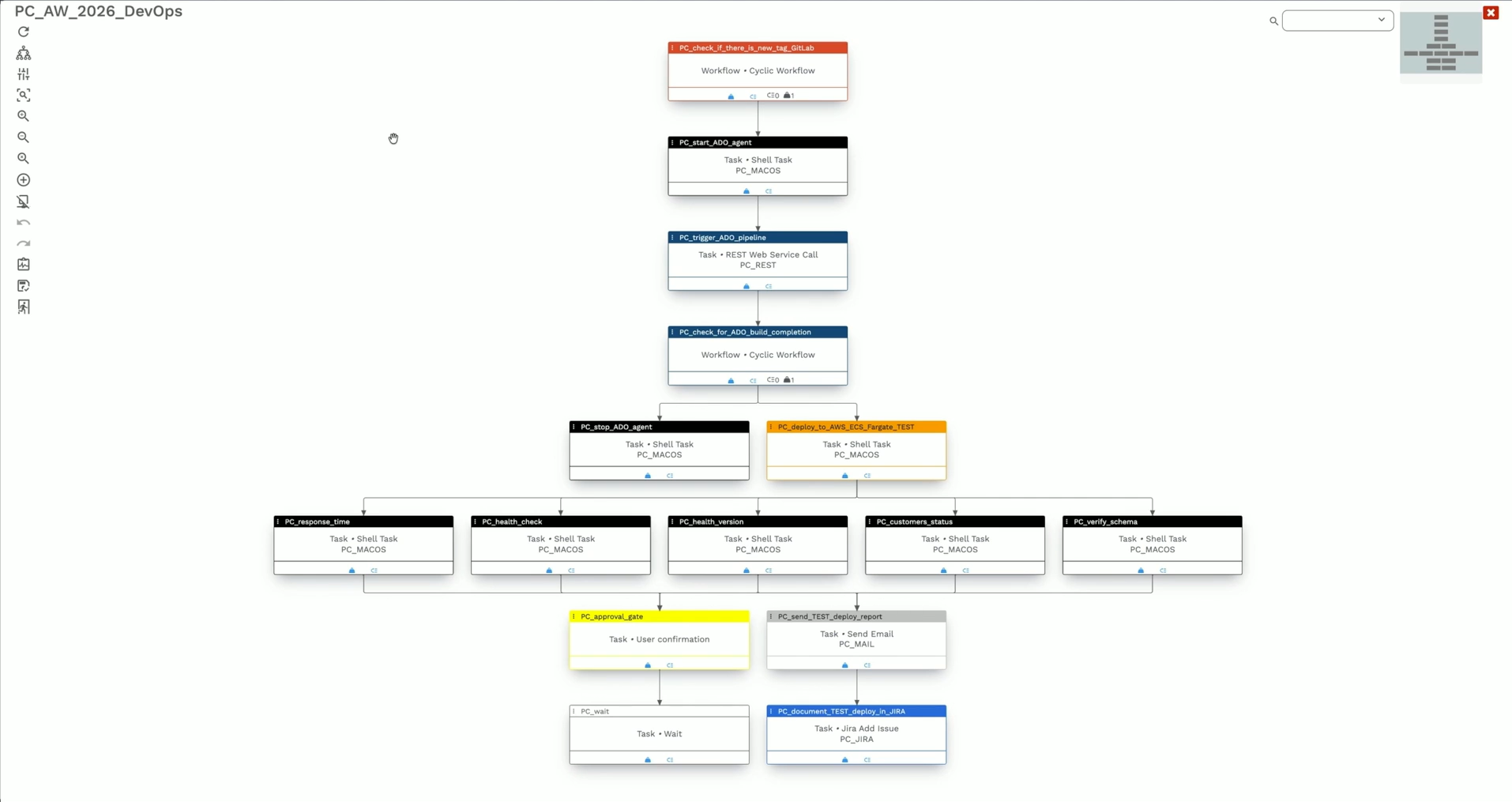
1. Beta Systems ANOW! Suite: Best for Enterprise Workload Orchestration
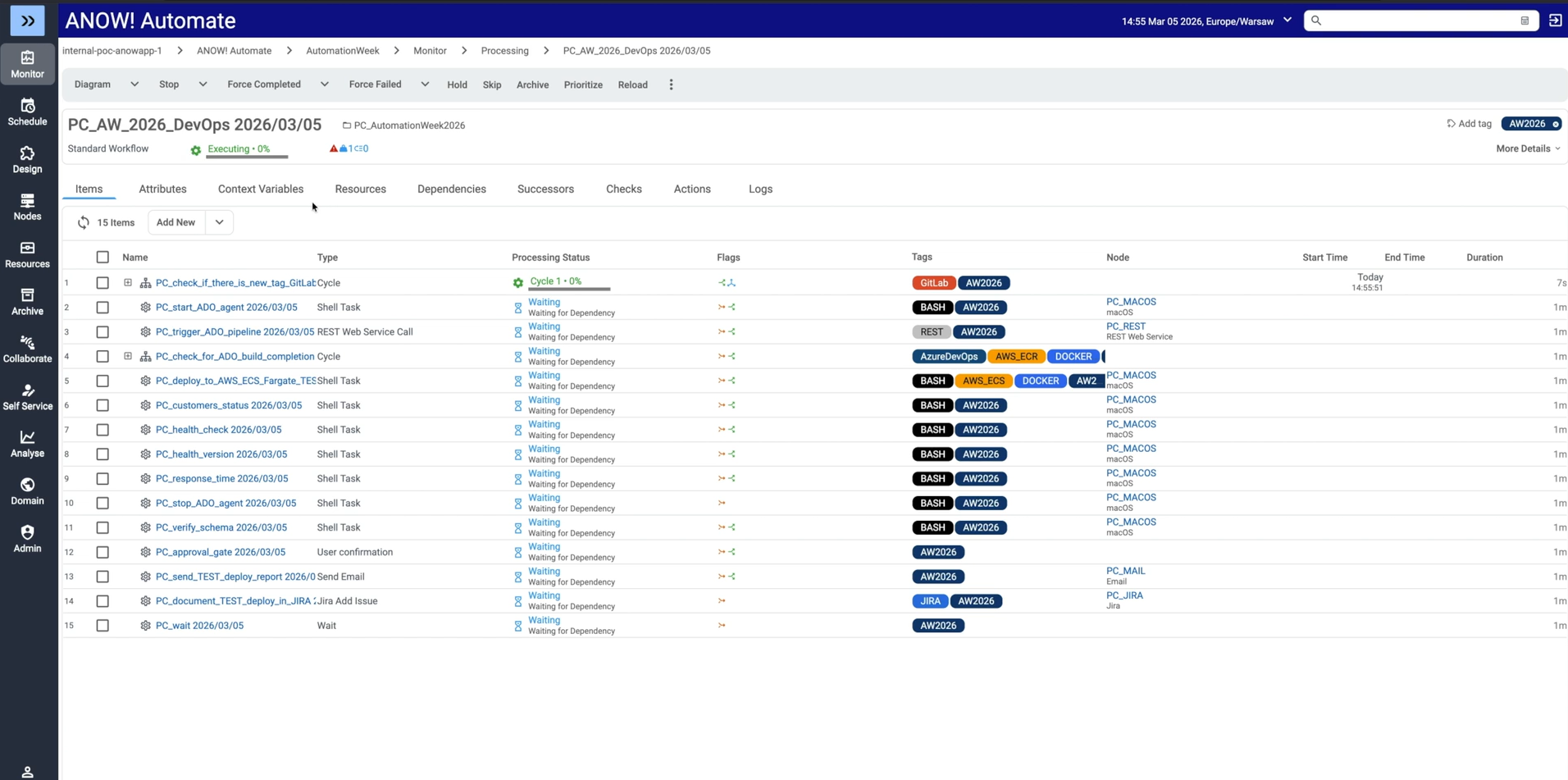
For large enterprises managing complex, interdependent automation workflows across hybrid environments, Beta Systems ANOW! Suite delivers a level of orchestration that CI/CD tools and point schedulers cannot match.
Recognized as a Leader in the 2025 Gartner Magic Quadrant for Service Orchestration and Automation Platforms, ANOW! combines workload automation, observability, and AI-driven intelligence in a single cloud-native enterprise automation platform.
Gartner highlights ANOW!’s unified observability component as a key competitive differentiator, providing a real-time view into the health and performance of an organization’s entire hybrid IT landscape.
In a DevOps context, ANOW! functions as a meta-orchestrator. It doesn’t replace your CI/CD toolchain but it coordinates deploy pipelines, data pipelines, and operational workflows across the entire application stack from a single control plane.
Best for:
Enterprises replacing legacy workload automation platforms (BMC Control-M, Broadcom Automic/AutoSys)
Organizations that need a single orchestration layer above their DevOps toolchain
Particularly strong for BFSI, manufacturing, and retail enterprises managing SAP workloads alongside modern cloud pipelines
2. Jenkins: Best for Teams with Deep CI/CD Customization Needs
Jenkins is the category-defining CI/CD automation server and one of the most recognized names in DevOps automation.
Its plugin ecosystem (which has thousands of community integrations) makes it adaptable to nearly any tool stack. Teams build tailored deploy pipelines using Groovy scripting, PowerShell workflows, and graphical editors.
However, at an enterprise scale, Jenkins requires significant engineering overhead to maintain. It lacks native hybrid cloud management, cross-system job dependency tracking, and SLA monitoring.
This means enterprises typically operate it alongside multiple point tools, creating fragmented visibility. For teams that need Jenkins’ CI/CD depth alongside enterprise orchestration, ANOW! operates as the coordination layer above it.
Best for: Engineering teams with strong DevOps capacity that need deep CI/CD customization and are comfortable managing pipeline infrastructure.
3. GitHub Actions: Best for Cloud-Native Teams on GitHub
GitHub Actions has become the default CI/CD choice for cloud-native teams managing source control systems on GitHub.
Its event-driven architecture triggers automation workflows directly from repository events (commits, pull requests, releases) without a separate CI server.
Pro Tip
Beta Systems explicitly supports GitHub within ANOW!’s Jobs-as-Code framework, meaning enterprises can use GitHub Actions for CI/CD while ANOW! handles upstream orchestration.
Shared workflows across repositories enable standardization at scale, and native integration with Azure Pipelines, Google Cloud, and AWS supports multi-cloud deployments.
Best for: Cloud-native teams building on GitHub that want tightly integrated CI/CD with minimal infrastructure overhead.
Challenges of DevOps Automation
Automation can solve a lot of problems but also introduce new ones if not implemented carefully.
Toolchain Complexity
Most teams don’t run one tool; they run twelve.
Jenkins, Terraform, Docker, Kubernetes, Datadog… getting these to work together takes real integration effort (especially when teams also rely on batch job scheduling to coordinate automated workloads across environments)
Poorly connected pipelines create gaps where things silently fail, and debugging across multiple systems is time-consuming. Other issues include:
Tool sprawl increases maintenance overhead
Integrations break when tools update independently
Onboarding new engineers becomes harder
→ See how infrastructure automation tools simplify complex toolchains.
Security and Access Control
Automation requires credentials, and credentials are often a target.
Hardcoded secrets in pipeline configs, overly permissive service accounts, and unsecured CI environments are common attack vectors.
Teams need robust identity access management practices baked into their pipelines from day one, including applying the principle of least privilege to every automated process.
Cultural Resistance
Automation changes how people work but the challenge is that not everyone will embrace that.
Ops teams worried about job security, developers resistant to new workflows, and siloed teams that don’t communicate: these are just as much of a blocker as any technical challenge.
DevOps transformation is as much about people as it is about pipelines.
DevOps Automation Best Practices
Getting DevOps automation right is a matter of building incrementally, with security and observability in mind from the start.
Automate the CI/CD Pipeline First
The highest-ROI starting point is your CI/CD pipeline. Automating builds, tests, and deployments gives immediate, measurable results with shorter release cycles and fewer production incidents.
To do this:
Define pipeline stages clearly before automating them
Use environment parity (dev = staging = prod) to avoid “works on my machine” issues
Gate deployments on test pass rates, not just build success
Pro Tip
Beta Systems’ ANOW! Automate helps enterprise teams orchestrate complex workloads across hybrid environments without the toolchain sprawl. See how it fits into your DevOps pipeline.
Use Event-Driven Automation
Scheduled jobs have their place, but event-driven automation is more responsive and efficient.
Trigger deployments on code merges, scale infrastructure on traffic spikes, and initiate rollbacks on error rate thresholds, all without human intervention.
This keeps systems reactive and reduces the lag between an event and the appropriate action.
Build With Migration and Longevity in Mind
Automation strategies that work today may not work at scale tomorrow.
Avoid locking yourself into a single vendor or tool by using open standards (YAML pipelines, IaC modules) and designing for portability.
A future-proof automation strategy means you can swap tools as your needs evolve, without rebuilding everything from scratch. Make sure to:
Document every automated workflow, not just the code
Version-control your pipeline configs like application code
Review and refactor automation regularly, just like any technical debt
Build Smarter DevOps Automation with Beta Systems
DevOps automation is only as strong as the DevOps automation platform behind it.
Beta Systems helps enterprise teams move beyond fragmented toolchains with unified workload automation, real-time observability, and orchestration built for complex, hybrid environments.
If you’re ready to streamline your pipelines, explore ANOW! Automate and the full ANOW! Suite.
Take Control of Your Entire DevOps Pipeline.
Beta Systems' ANOW! Automate helps enterprise teams orchestrate workloads across hybrid environments without the toolchain sprawl. See how it fits into your DevOps pipeline.
:quality(50))
:quality(50))
:quality(50))