:quality(50))
Layer-3 Topology
The new Layer-3 Topology feature gives network teams a complete view of routing relationships and IP transport paths across their infrastructure. It bridges the gap between Layer-2 connectivity and Layer-3 routing, showing how data flows logically through routers and links, and helping engineers quickly identify bottlenecks, routing issues, or misconfigurations.
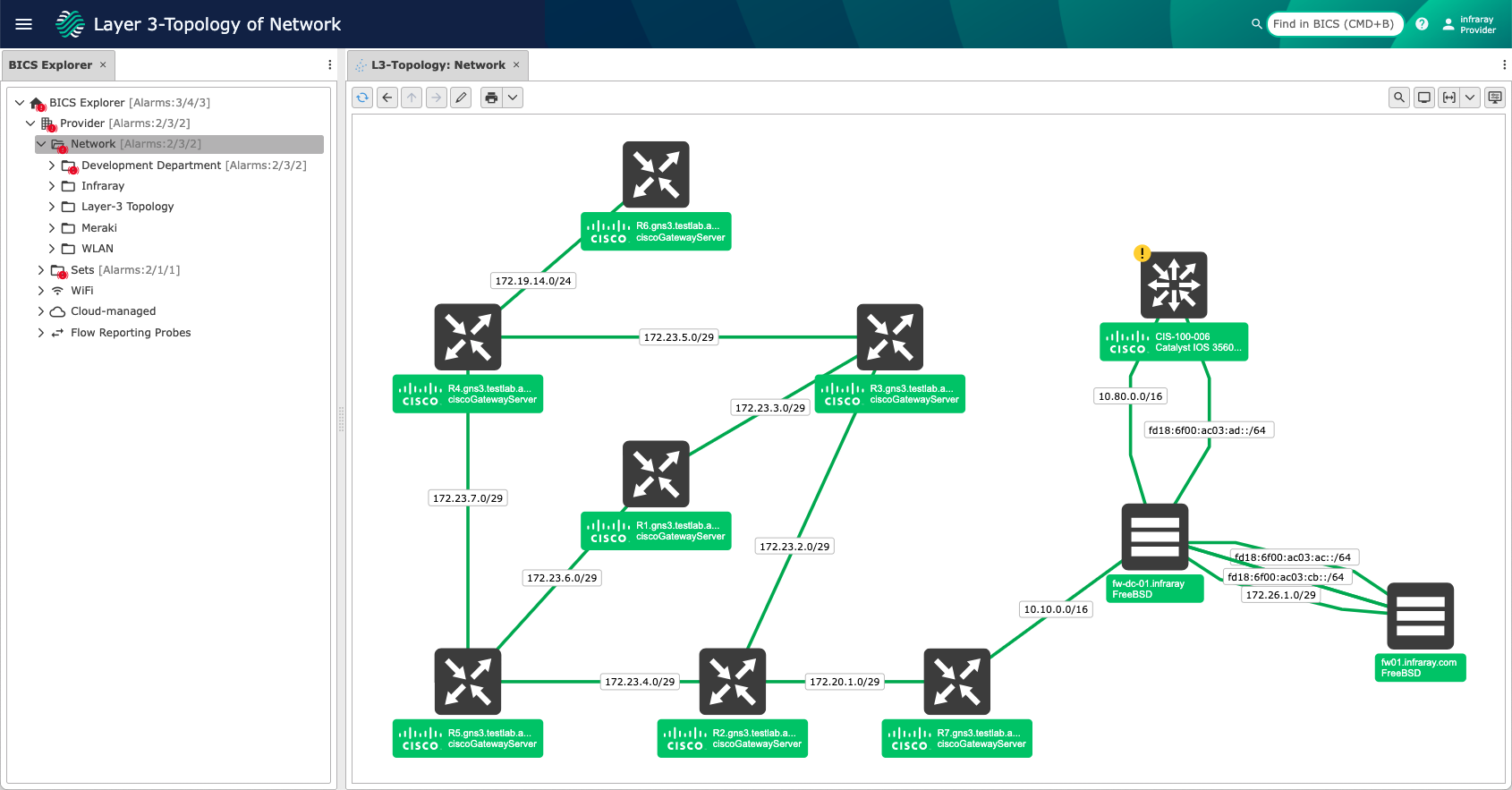
Layer-3 Topology View
Accessed via the action “Open Layer-3 Topology” for any folder or device set.
Displays all routers within the selected scope along with their connected transport networks.
Hover tooltips show detailed information about connected devices and interfaces.
Double-click a transport network to instantly open the Routing View between connected routers.
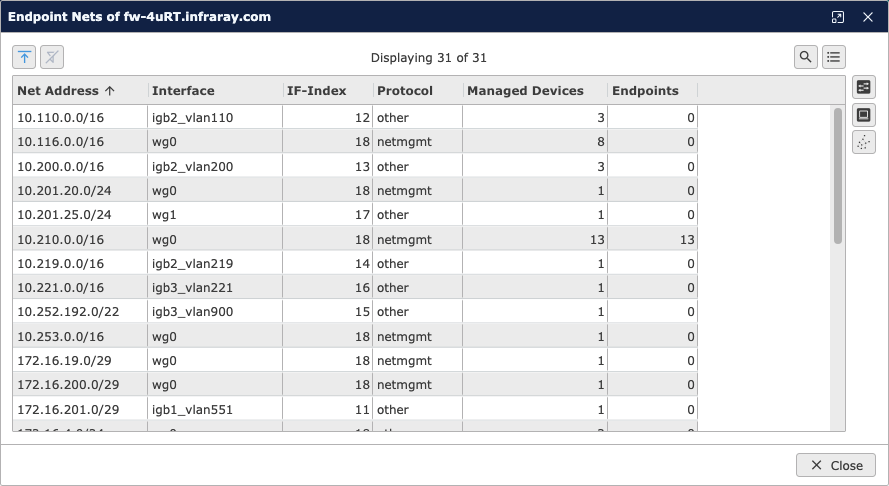
Endpoint networks are marked with a blue annotation icon; double-click for a detailed list of connected endpoints and device counts.
Routing View
Available for all Inventory Devices and Endpoints through the action “Open Routing View.”
Supports one or two device selections for route tracing; when one is selected, a dialog prompts for the destination device.
The Routing View visualizes the complete data path between devices, helping operators understand how traffic traverses the network.
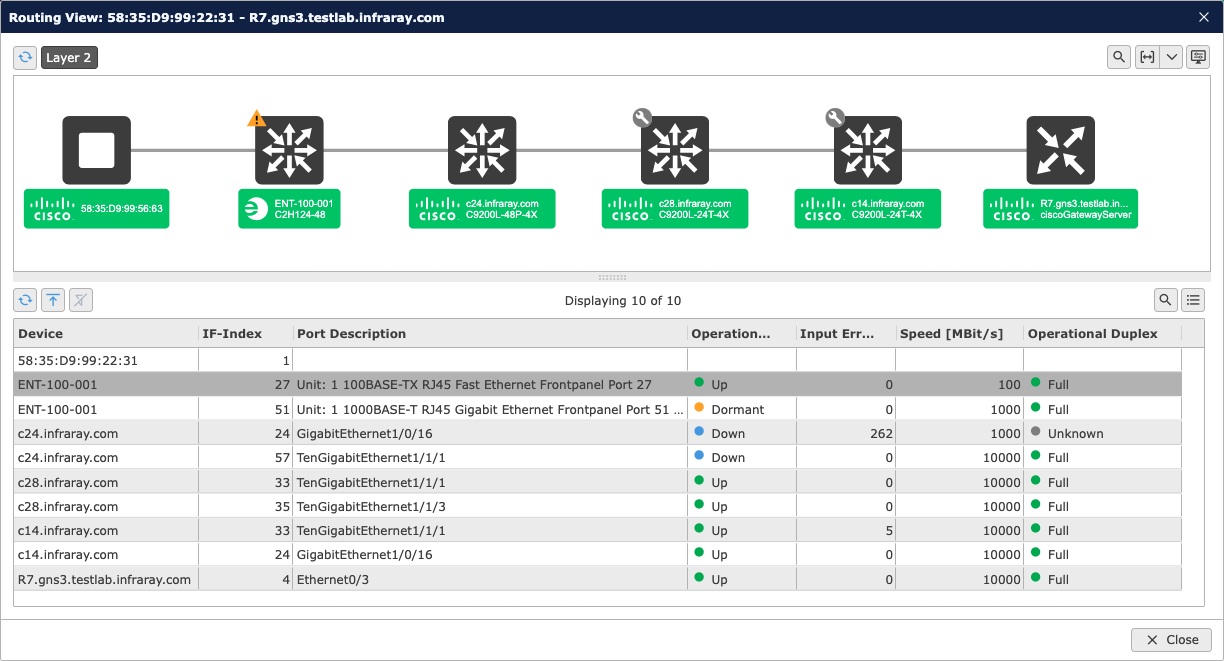
Graphical View: Visual representation of all devices and connections along the route.
Shows Layer-2 segments until the first router on each side is reached, then continues as Layer-3 routing paths.
Layer-2 elements can be hidden to focus on the Layer-3 route view.
Tabular View: Displays all devices along the route, including interface details and live operational states (e.g., speed, status, and errors).
Full IPv6 Support
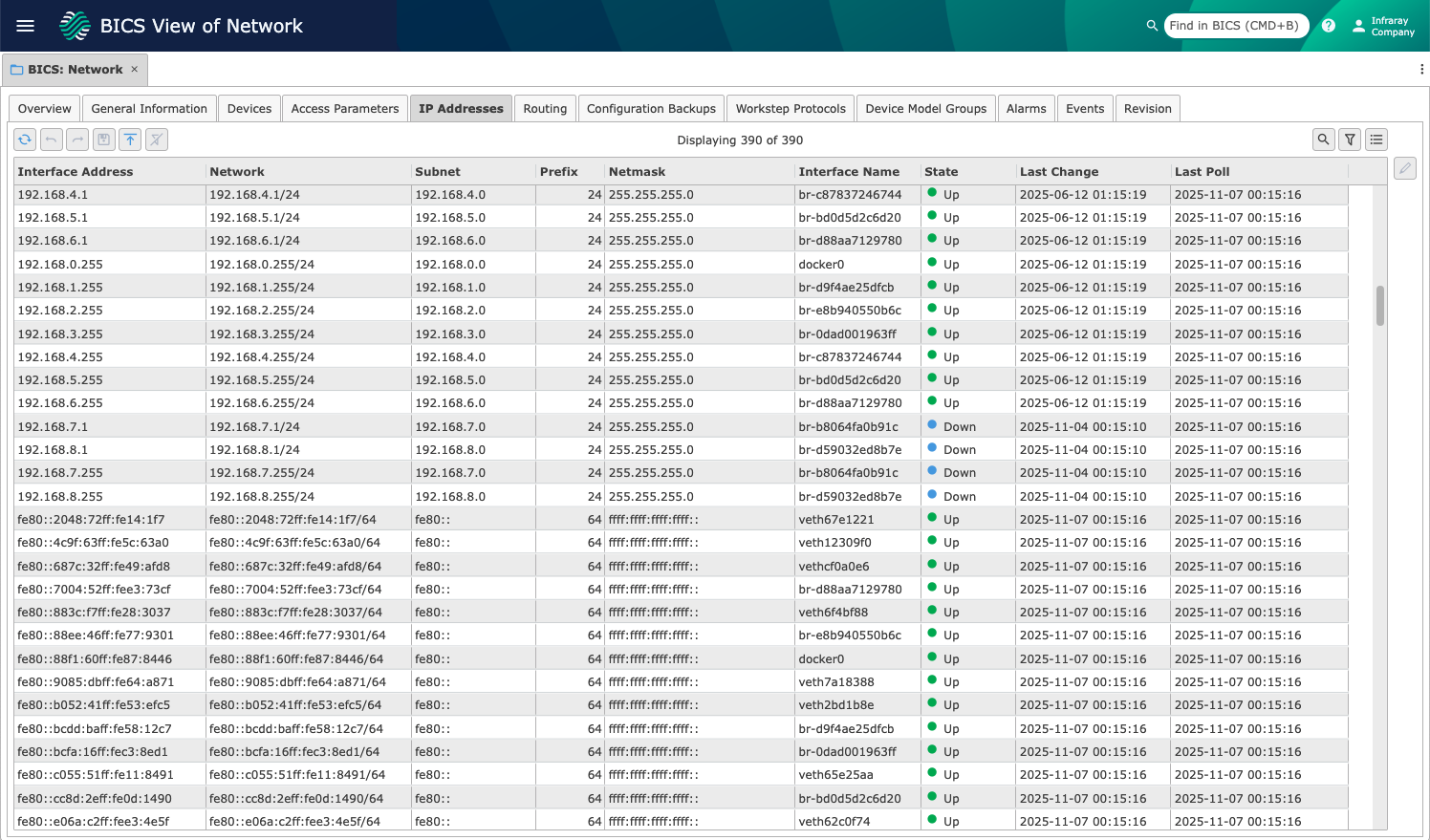
Infraray BICS now offers full IPv6 support across IP address and routing management, extending visibility and control beyond traditional IPv4 networks. Network administrators can now seamlessly monitor, analyze, and visualize IPv6-enabled devices, interfaces, and routing paths alongside existing IPv4 data.
With dual-stack environments becoming the norm, this enhancement ensures that both IPv4 and IPv6 information is collected, correlated, and displayed in a unified view – simplifying troubleshooting, planning, and transition management.
IP Address Tables:
Infraray BICS reads both the legacy ipAddrTable (IPv4) and the modern ipAddressTable (IPv4 and IPv6).
The data is merged to present a complete, unified overview of all IP interfaces.
Routing Tables:
In addition to ipRouteTable (.1.3.6.1.2.1.4.21), Infraray BICS now includes ipCidrRouteTable (.1.3.6.1.2.1.4.24.4) and inetCidrRouteTable (.1.3.6.1.2.1.4.24.7).
These tables extend routing discovery to include IPv6 routes, ensuring accurate mapping of dual-stack networks.
With this update, Infraray BICS provides end-to-end support for IPv6, enabling complete visibility across modern hybrid networks and ensuring operational readiness for IPv6-driven infrastructures.
HTTP API Communication
Infraray BICS now supports communication and management through standardized HTTP APIs, extending compatibility with modern network devices and operating systems.
As more vendors move away from SNMP for configuration and monitoring, Infraray BICS adapts to this shift by integrating directly via HTTP-based interfaces. This allows administrators to manage devices that no longer support SNMP for read or write operations.
This new capability already includes support for platforms such as HP Aruba OS, ensuring that Infraray BICS remains ready for the evolving landscape of modern, API-driven network infrastructures.


Search Devices by Port Information
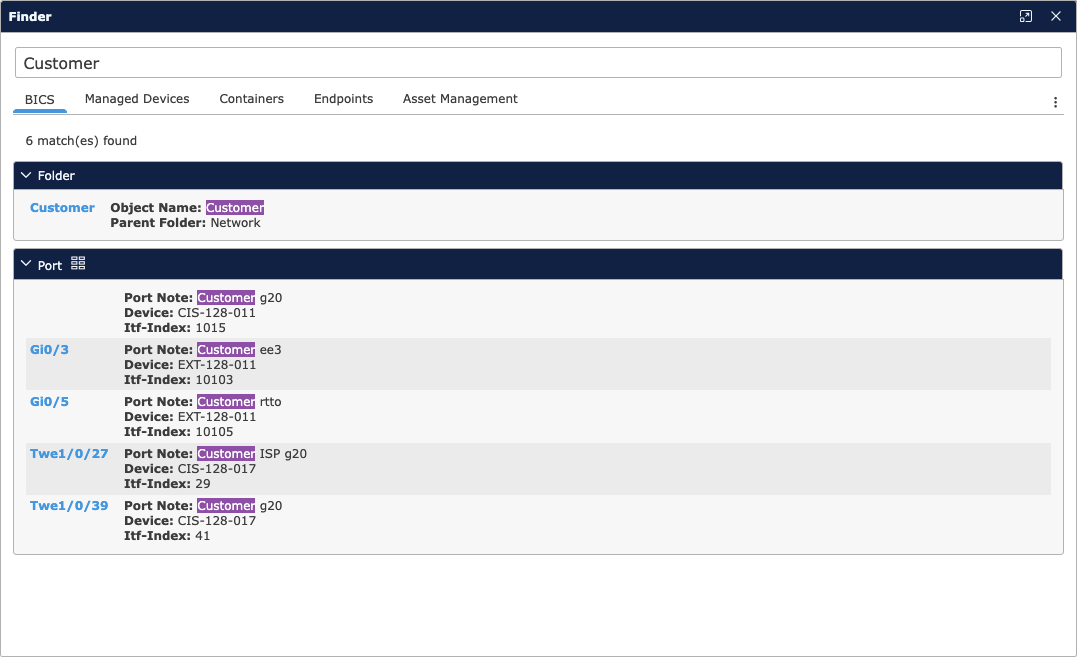
Infraray BICS now enables administrators to search for devices using port-level data, making it easier to locate equipment linked to specific clients, services, or network functions.
Searches can be performed using the interface alias (ifAlias) – commonly used to label ports with client or connection details – or by Port Notes, which allow administrators to add custom annotations.
This feature simplifies day-to-day network operations, helping teams identify relevant devices faster and manage client-specific connections with greater efficiency.
HTTP Request
Event & Alarm Actions now support a new ‘HTTP Request’ action, enabling flexible integrations with external systems. Configurations include HTTP methods (GET, PUT, POST, DELETE), URLs, request bodies (for PUT/POST), and custom headers.
Optionally, an object type (device, endpoint, connection) can be specified to unlock additional placeholders for text parameters.
For security, sensitive HTTP header values such as Authorization, Cookie, Set-Cookie, and Proxy-Authorization are encrypted in database records and export files.


Device Capabilities
New Device-Specific Detail Views
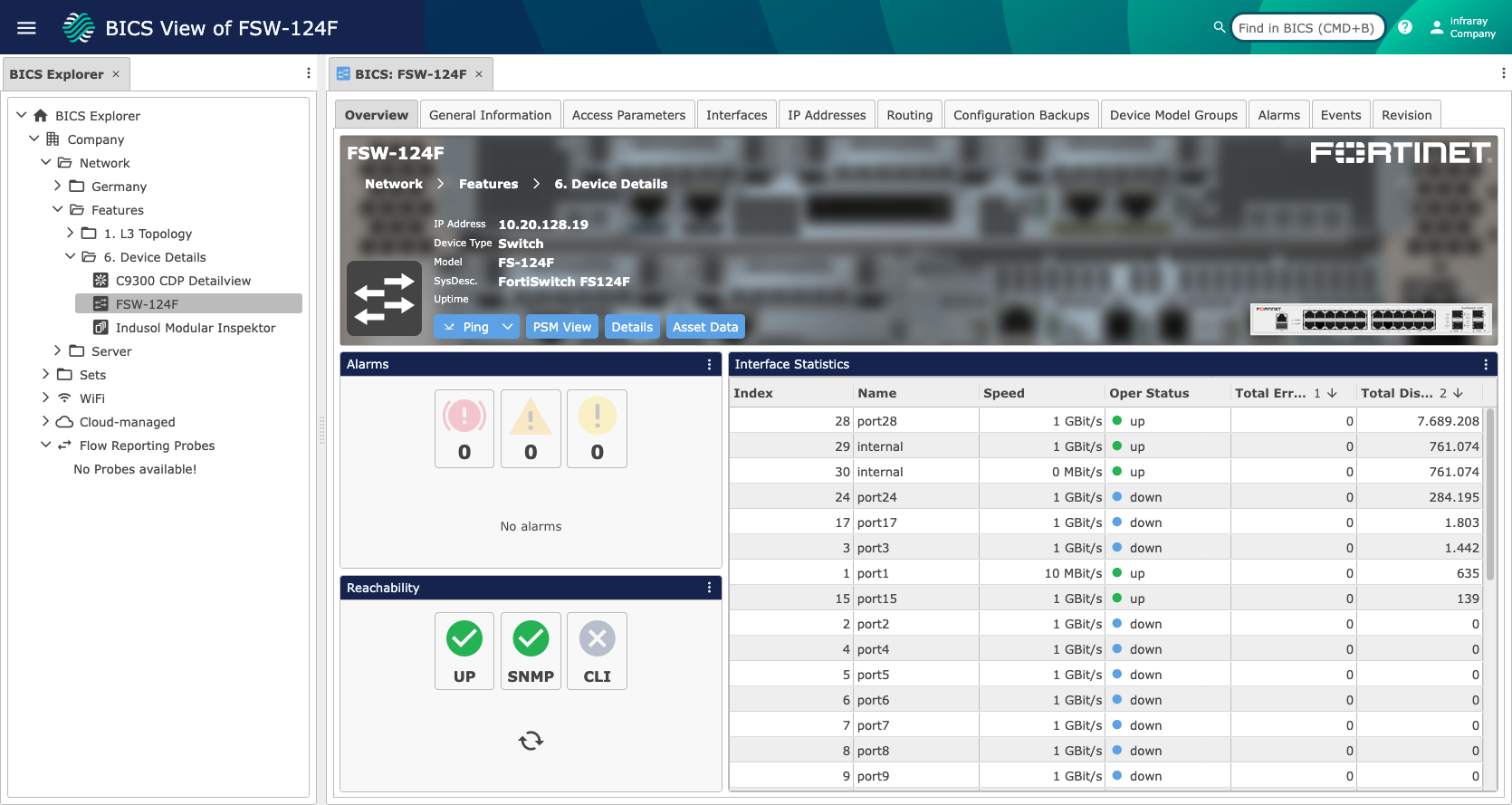
Additional Detail Views have been introduced for several device types, including Fortinet switches, Ubiquiti Access Points, ABB UPS devices, and InduSol switches. These tailored views provide clearer insights for managing these devices.
Extended Device Identification
Infraray BICS can now recognize additional device models, including new Cisco products and Palo Alto firewalls. Identification is based on SysOID and model-specific descriptions.
SSH Key Authentication for CLI
Infraray BICS now supports SSH key-based authentication for CLI access, adding a more secure and convenient alternative to password-based logins.
Administrators can select the new protocol type “SSH with Private Key” directly in the WebGUI and manage SSH identities through an integrated dialog. This simplifies credential handling, strengthens access security, and aligns Infraray BICS with modern authentication standards commonly used in enterprise and network infrastructure environments.
Additional Features and Enhancements
In addition, this release includes a wide range of further enhancements and optimizations that improve usability, increase efficiency, and make Infraray BICS overall more robust and user-friendly.
:quality(50))
:quality(50))